Guide · Software / SaaS
Does your business need custom software or off-the-shelf SaaS?
Build your own platform or pay for a subscription. We show you how to compare cost, timelines and scalability so you decide with numbers, not hype.
Definitions
SaaS (software as a service) is a program you rent by subscription and that thousands of companies use on the same foundation. Custom software is a system built for your processes: it does what your business needs, the way it needs it, and it belongs to you.
01 The difference
Side by side, no fine print.
Neither option wins on everything. The question is what matters most for your business.
| Criterion | Off-the-shelf SaaS | Custom software |
|---|---|---|
| Upfront cost | Low or none: you sign up and start. | High: it has to be built before you can use it. |
| Monthly cost | A subscription that grows with every user or plan. | Hosting and maintenance, with no per-user fees. |
| Time to get started | Days. | Weeks or months, in phases. |
| Fit with your process | You adapt to the tool. | The tool adapts to you. |
| Ownership | The software belongs to the vendor; your data lives on its servers. | The system and the data belong to you. |
| As you grow | You pay more for every person you add. | Adding users doesn't change the license. |
| Integrations | Whatever the vendor offers. | Whatever your operations need. |
| Main risk | Price changes, new terms or the product shutting down. | Choosing the wrong team to build it. |
02 When to choose each
When each option wins.
If your process is the same as thousands of other companies', rent. If your process is the reason customers choose you, build it.
SaaS is the right call if…
- Your process is standard: accounting, payroll or invoicing with an established, compliant provider.
- Your team is small and won't grow much in the next few years.
- You're validating an idea and don't yet know what you really need.
- You need to start this week and your upfront budget is limited.
Building custom makes sense if…
- The way you operate is your edge over the competition and no SaaS respects it.
- You pay per user and every new hire raises your software bill.
- You glue four or five tools together with spreadsheets and copy data by hand.
- You want to sell your system to others: then the software is your product.
03 Hidden costs
The costs that don't show up in the quote.
Comparing the first month’s price is misleading. Compare the total cost over three years, with everything each option brings along.
The three-year math
SaaS = subscription × users × 36 months + integrations + hours lost to manual workarounds
Custom = initial development + hosting and maintenance × 36 months + new features
- Price increases
SaaS vendors can raise prices or change plans at renewal, and if you pay in a foreign currency, exchange rates add to it. The same subscription can cost noticeably more from one year to the next.
- Per-user pricing
What costs little today with five people multiplies when there are twenty. Run the numbers with the team you expect to have, not the one you have today.
- Manual workarounds
The hours your team spends exporting, pasting and fixing data between tools are a cost too, even if they don't arrive on an invoice.
- Maintenance
Custom software isn't delivered and forgotten: it needs hosting, backups, security updates and improvements. Budget for it from the start.
- The exit
If one day you want to switch SaaS, can you export all your data in a usable format? If not, staying has a price too.
04 The middle path
It doesn't have to be all or nothing.
The companies that decide best mix both: they rent what is standard and build what makes them different.
-
SaaS for the standard stuff
Accounting, invoicing and email stay on proven tools. There's no point reinventing what already works the same for everyone.
-
Custom for what's yours
The quote builder with your rules, inventory control the way your warehouse runs it or a portal for your customers are built custom and connected to the rest.
-
In phases
You start with the module that saves you the most money or time, use it, measure it and then add the next one. That way risk and investment come in stages.
05 Before you decide
Six questions before you sign anything.
Answer them with your team. If most answers point to “yes,” custom development is worth evaluating; if not, a good SaaS will probably serve you well.
- 01 · Your process
Is the way you work different from your competitors’, and is that difference the reason your customers choose you?
- 02 · Your team
Do you expect your team to grow over the next three years, so that per-user pricing turns into a bigger and bigger bill?
- 03 · Your tools
Do you pay for several tools today that don't talk to each other, with someone spending hours every week moving data between them?
- 04 · Your data
Do you handle sensitive customer or business data that you'd rather keep under your control than on a third party's server?
- 05 · Your integrations
Do you need to connect with systems SaaS tools don't support, like a local supplier's system, a specific payment gateway or your own inventory?
- 06 · Your horizon
Do you plan to use this system for years, or even sell it to other companies as a product?
06 A real case
Paperclip: when per-user pricing was the problem.
Agencies tend to split their operations between a project manager, a CRM and spreadsheets, and they pay more every time someone joins the team. Paperclip is Blinq's own product: it brings projects, finances, CRM and document control together in one platform, with a flat rate instead of per-user pricing.
See how we build custom software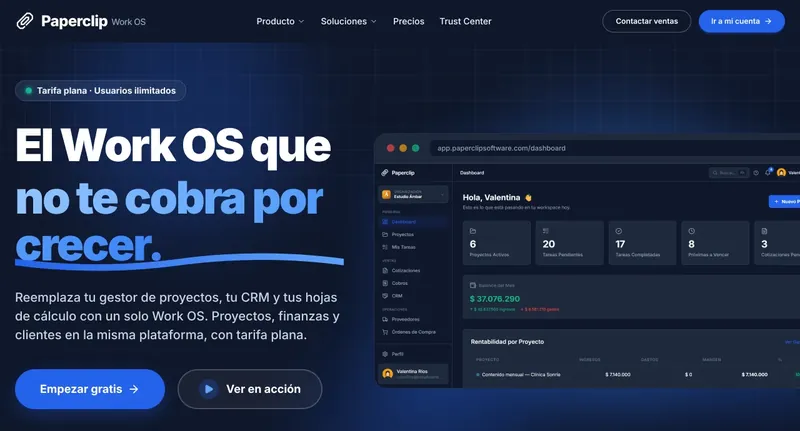 PaperclipSaaS · Work OS
07 Questions
Frequently asked questions about custom software and SaaS.
Have another question? Message us and we'll reply the same business day.
Ask on WhatsAppWhat is SaaS?
SaaS stands for software as a service: a program you use from your browser or an app and pay for with a monthly or annual subscription, usually per user or per plan. The vendor hosts, updates and maintains it, and thousands of companies use it on the same base configuration.
Is custom software always more expensive?
Up front, almost always: it has to be built before you use it. But over several years, especially when the SaaS charges per user and your team grows, the math can change. The honest way to compare is to add up the total cost of each option over three years, including the hours your team loses to manual workarounds.
Do I own the code and the data?
With custom development at Blinq, ownership of the deliverable passes to the client once paid in full, and the data is yours from day one. With SaaS, the software belongs to the vendor and your data lives on its servers: always check how to export it if you ever decide to leave.
Can I start with SaaS and move to custom later?
Yes, and it's often the smartest move: SaaS helps you understand your process and validate what you really need. The key is to choose one that lets you export your data, so the migration doesn't start from scratch.
How much does custom software cost?
It depends on the scope: how many modules, how many user types, which integrations and how complex your business rules are. That's why it's built in phases, starting with the module that delivers the most value. At Blinq we quote it in writing after a free technical assessment.
Build or rent? Let's run the numbers together.
We review your processes and the tools you pay for today, and tell you what's worth building and what isn't. Free, with no commitment.